The interesting part starts after installation
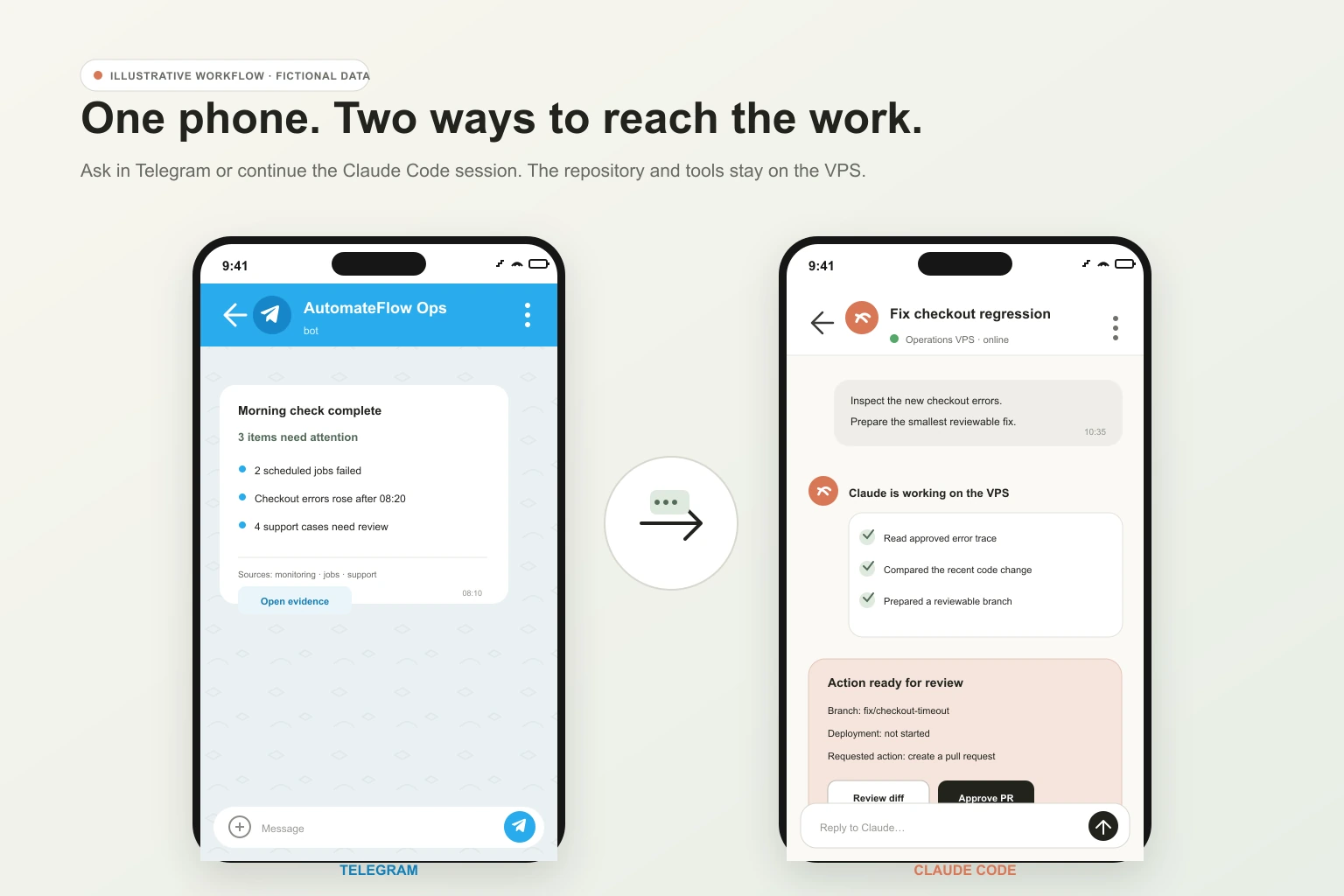
Claude Code on a VPS can become a remote workspace that is still there when your laptop is closed. From a phone, you can ask it to inspect a repository, check a log, prepare a support reply, follow a long-running test, or react to an approved event. With the right integrations, it can also read selected business systems and prepare actions for a person to approve.
That is a much bigger idea than "Claude in a terminal." A normal chatbot waits for context to be pasted into a conversation. Claude Code runs beside the repository, scripts, command-line tools, and connections you chose to make available. According to Anthropic's explanation of how Claude Code works, those tools let it read and edit files, run commands, use Git, search the web, and connect to external services.
The VPS adds continuity. It is a replaceable Linux machine with a stable workspace and network identity. It does not host the Claude model itself, and it does not turn Claude Code into a safe autonomous employee. It gives the client and its tools somewhere to run.
This page is about the possibilities and the operating model. When you are ready to build it, use the separate technical playbook for installing and securing Claude Code on a VPS. It includes the commands, recovery steps, permission example, and downloadable configuration pack.
Evidence note: The day and business examples below are illustrative. They show workflows this architecture can support when the named data sources, tools, permissions, and approvals exist. They are not a claim that AutomateFlow ran these exact scenarios in production.
Imagine an ordinary Monday
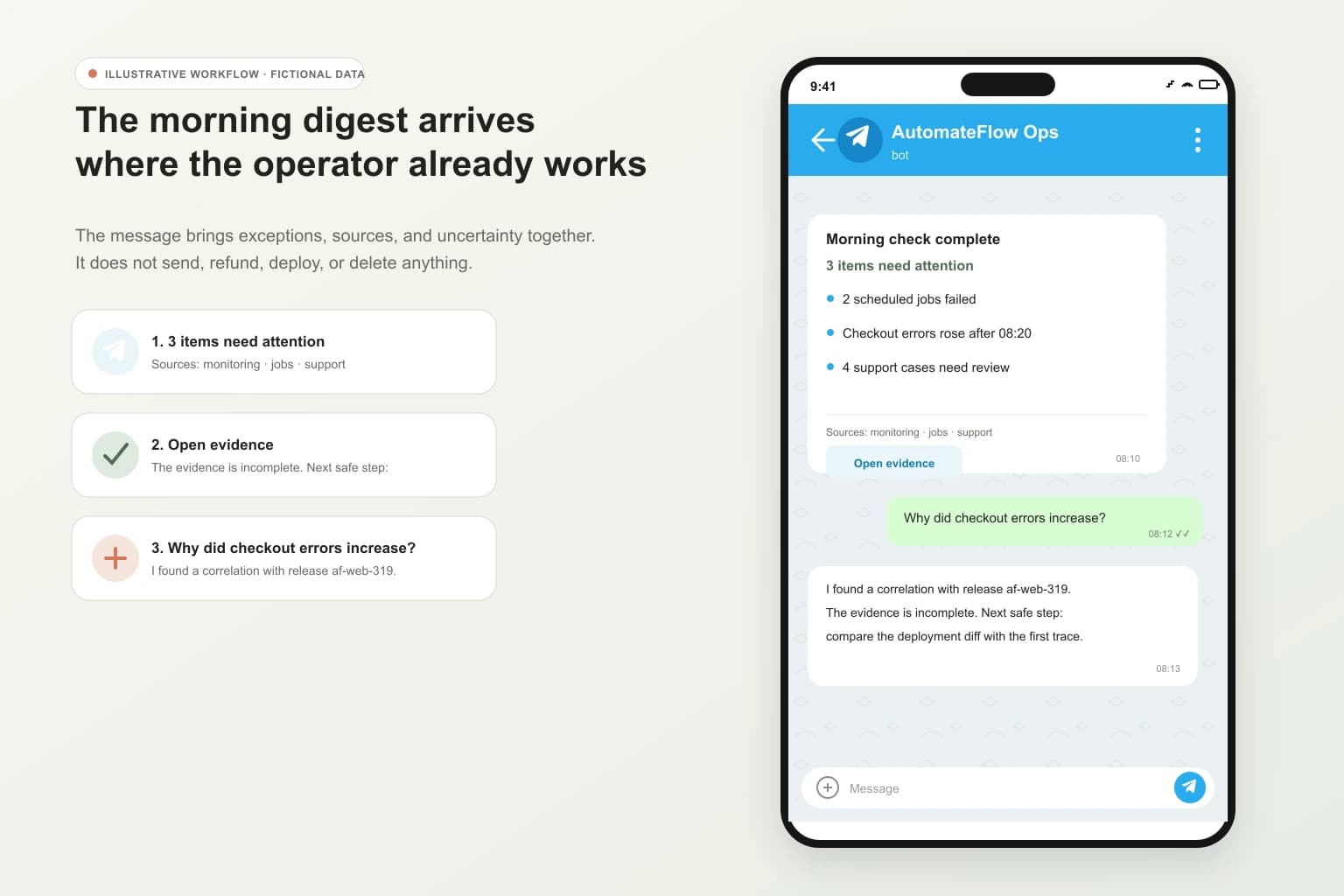
At 08:10, before the laptop opens, one useful message is waiting on the phone. It says which scheduled jobs failed, which support cases are still unresolved, and which operational number moved far enough to deserve attention. Each item links back to its source. Nothing has been sent, refunded, deployed, or deleted.
At 10:35, someone asks: "Why did yesterday's checkout failures increase?" The agent reads the approved error logs, searches the relevant code path, compares recent changes, and returns a short explanation with the files and events that support it. If the evidence is weak, the useful answer is "I cannot establish the cause yet," followed by the next safe check.
At 12:20, a difficult support ticket arrives. The agent finds the customer's recent events, checks the relevant policy, and drafts a reply. The phone shows the evidence and the draft. A person edits it and decides whether it should be sent.
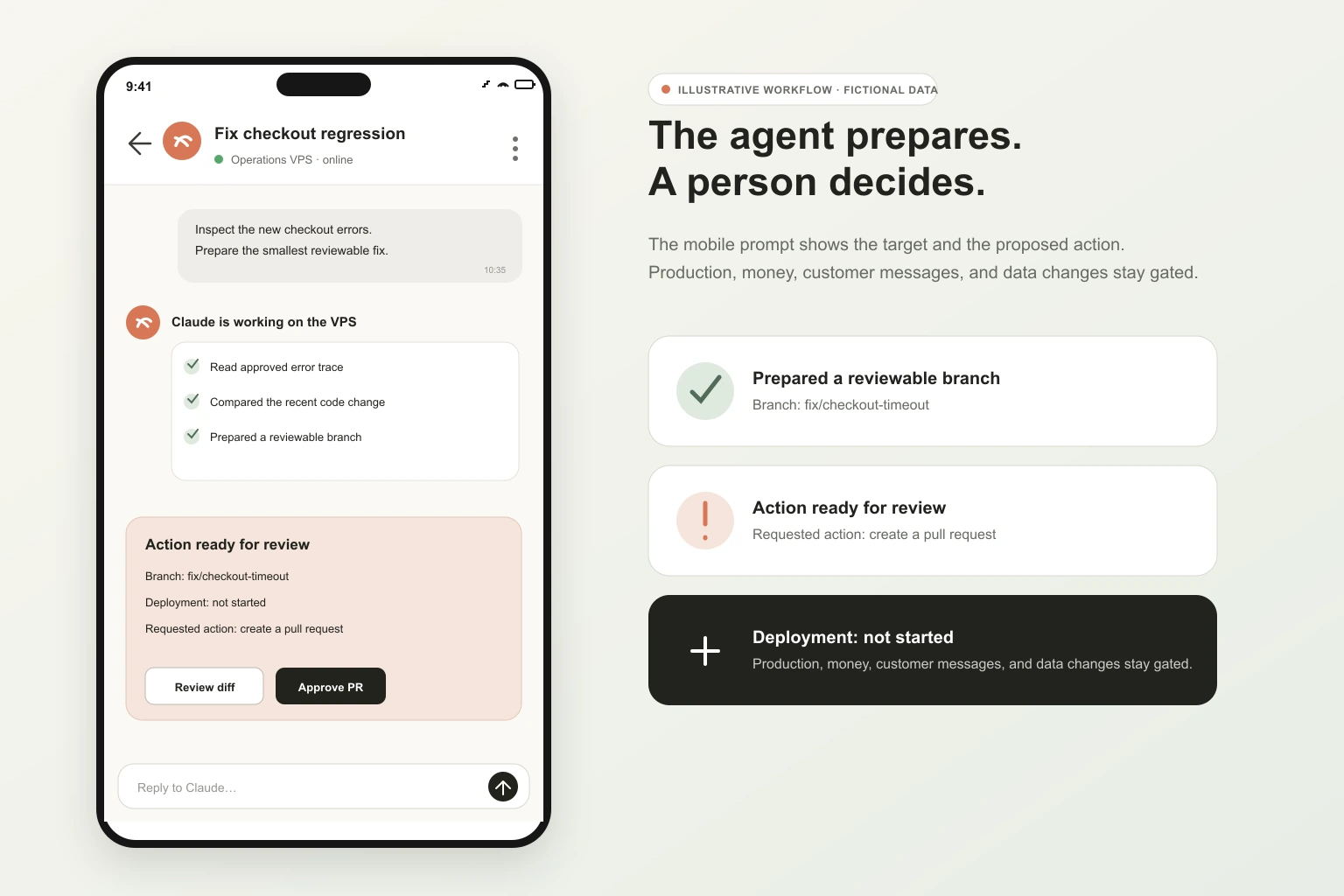
At 16:40, monitoring reports a new application error. The agent can open a disposable branch, trace the stack, propose a patch, and run the existing test suite. A pull request is useful. A silent production deploy is not.
Later, the same VPS can keep a test, research task, or repository session available while the operator travels home. The work did not move into the phone. The phone became a control surface for a process running elsewhere.
This is the part that makes people curious: the gap between noticing a problem and gathering the evidence can shrink to one message. The difficult part is deciding which systems may answer, which actions may run, and where the agent must stop.
What changes when Claude Code moves to a VPS
Running Claude Code on a laptop is often the simplest choice. The VPS becomes useful when one or more of these constraints appear:
- The same workspace must be reachable from a laptop, tablet, or phone.
- A terminal session or long task should survive an SSH disconnect.
- Webhooks, monitoring alerts, or chat messages need a stable destination.
- A repository needs a clean Linux environment that is separate from a personal computer.
- Scheduled work needs a host that is usually online.
- The team needs a machine it can snapshot, replace, restrict, and decommission independently.
The move does not improve Claude's judgment. It changes availability, proximity to tools, and operational ownership. A poorly scoped laptop agent becomes a poorly scoped server agent, except the latter may stay available for longer and receive more events.
What Claude Code can actually do on a VPS
The useful answer depends less on the VPS provider and more on the tools and authority attached to the Claude Code process.
Swipe or scroll to compare the columns.
| Outcome | What the agent can do | What must exist first | Safe first boundary |
|---|---|---|---|
| Answer questions about a codebase | Search files and history, trace behaviour, explain a module, find where a rule lives | A checked-out repository and read access | Read-only exploration on a non-production copy |
| Investigate an error | Read logs, correlate a stack trace with code, inspect recent changes, propose a test | Approved log access and a repository | Redacted logs and no production shell |
| Prepare a code change | Edit files, run formatters and tests, create a reviewable diff or branch | Build tools, test data, Git policy | Disposable branch with no automatic merge or deploy |
| Create an operations digest | Query approved read-only sources, compare states, summarize exceptions, link evidence | Stable APIs, database views, or scripts with defined metrics | Read-only source credentials and explicit freshness labels |
| Triage support | Gather account events, find policy, classify the issue, draft a reply | Support system connector and customer-data rules | Draft only; a person sends the message |
| Watch for an event | Receive a CI failure, monitoring alert, webhook, or chat message and investigate | A Channel, MCP server, webhook receiver, or polling job | Allowlisted senders and a narrow event schema |
| Run recurring work | Execute a defined prompt or script on a schedule, then store or send the result | A session task, Routine, CI schedule, cron, or systemd timer | Start with reports and verification, not irreversible actions |
| Research and document | Search approved sources, compare documentation, update internal runbooks, draft release notes | Web access or connected document sources | Cite sources and require review before publishing |
Anthropic's common developer use cases include debugging, understanding unfamiliar code, planning refactors, writing tests, reviewing pull requests, working an issue, and turning repeated tasks into reusable skills. The business-facing examples above add integrations around those core capabilities. Claude Code cannot query a CRM, billing platform, inbox, or production database unless you connect it and give it a credential that can do so.
The best first use cases prepare decisions
An agent creates value before it receives authority to change anything. Three patterns are especially useful at the beginning.
It gathers evidence faster
Instead of opening a monitoring tool, a repository, a ticket, and a deployment history, the operator asks one question. The agent gathers the permitted evidence and returns the chain it followed. This works only when the source identifiers line up and the response preserves links, timestamps, and uncertainty.
It turns a blank page into a review
Support replies, incident notes, pull request descriptions, release notes, test plans, and internal procedures are good draft artifacts. A reviewer can reject or change them without undoing an external action.
It handles the repetitive path and surfaces exceptions
A scheduled check can inspect known conditions and report only what changed. The agent should not invent the threshold. The business rule belongs in a deterministic script or an approved policy, and Claude Code can investigate the exception that script raises.
Claude Code from a phone: three different experiences
"Use Claude Code from a phone" can describe very different systems. Choosing the right one avoids building a custom Telegram bot when a supported option already fits.
Swipe or scroll to compare the columns.
| Access path | What it feels like | Where the work runs | Important limit |
|---|---|---|---|
| Remote Control | Open the current Claude Code session in Claude.ai or the Claude mobile app, follow work, reply, and handle permission prompts | The Claude Code process on the VPS | The process must keep running; eligibility and authentication rules apply |
| Official Telegram Channel | Send a message to an allowlisted bot and receive the response in Telegram | The active channel-enabled session on the VPS | Channels are a research preview and messages arrive only while the session is open |
| Custom messaging service | A bot routes projects, stores thread state, starts or resumes sessions, and exposes custom controls | Your own service and Claude Code processes | You own authentication, timeouts, concurrency, secrets, updates, logs, and every failure mode |
Official Remote Control is the shortest path for continuing a running session from another device. The terminal process, tools, and files remain on the VPS. The remote connection uses the official web or mobile interface, and the local process must stay alive. A tmux session is a conventional way to keep it available after SSH disconnects.
Official Channels can push Telegram, Discord, iMessage, monitoring, and webhook events into a running session. The Telegram plugin uses pairing and an allowlist. That allowlist matters because a channel may also relay permission decisions. An account allowed to approve a tool call may be authorizing a real command on the VPS.
A custom bot becomes reasonable when you need project routing, organisation-specific identity, a custom approval interface, a queue, per-project timeouts, or an audit model the official interfaces do not provide. At that point, the bot is production software. Treat it like one.
The phone is a control surface, not the computer
The phone sends intent and displays progress. The VPS holds the working directory and executes the tools. Anthropic hosts the model interaction unless another supported model provider is configured. External systems provide the business facts.
That separation explains both the appeal and the risk. You can leave the laptop closed because the process is elsewhere. You can also trigger powerful tools from a small screen, with less context and more chance of approving the wrong thing. Mobile approval should show the proposed action, target environment, affected records, evidence, and recovery path. "Allow?" is not enough for a production deploy or database write.
What "Claude Code 24/7" really means
A server can be online all day while Claude Code does nothing. Four separate layers are often hidden inside the phrase "24/7 agent":
- The VPS is reachable.
- A Claude Code session or service is running.
- An event or schedule can trigger useful work.
- The result reaches a person or a protected destination, with failures reported.
tmux helps with the second layer after an SSH disconnect. It does not restart a dead process or repair a rebooted server.
Claude Code's session-scoped scheduled tasks run while Claude Code is active and idle. They do not catch up every missed execution. Anthropic points unattended schedules toward Routines, GitHub Actions, or desktop scheduling. Routines run in an Anthropic-managed cloud environment and can start from a schedule, API call, or GitHub event. A self-managed cron or systemd service can run on the VPS, but then you own its credentials, retry policy, logs, budget, and recovery.
The useful goal is not to make the model think without pause. It is to make a defined workflow available when its trigger appears.
The part that feels like memory
A good setup can feel as if it knows the company, but several different mechanisms create that feeling.
- The current session contains the conversation, tool results, and files loaded into its context.
- Resuming a session can restore the previous conversation around that working directory.
CLAUDE.mdstores project instructions and conventions that should be present in future sessions.- Claude Code can persist selected learnings through its memory features.
- A custom service can store thread-to-project mappings, summaries, correction logs, and structured business rules in its own database.
None of this means the underlying model retrained itself on your company overnight. A correction database is still data and code. It needs an owner, a schema, retention rules, access control, and a way to remove a bad instruction.
One practical pattern is a reviewed operating manual. When the agent makes a recurring mistake, the operator records the correction with an example. A weekly task can propose changes to the manual, but a person reviews them before they become standing instructions. Otherwise one misunderstood conversation can harden into a permanent rule.
Where this architecture becomes dangerous
The same connections that make the agent useful can make a single bad instruction expensive.
An incoming support message, issue description, document, webpage, or log line may contain text that tries to redirect the agent. This is prompt injection. Sender authentication does not make the content trustworthy. An allowlisted customer, employee, or service can still forward malicious or accidental instructions.
Checkpoints help reverse file edits. They do not undo an email, refund, production deploy, database mutation, credential rotation, or message sent to a customer. Those actions need a stronger gate than conversational confidence.
A sensible approval ladder looks like this:
Swipe or scroll to compare the columns.
| Level | Example | Default treatment |
|---|---|---|
| Read and explain | Search repository, read redacted logs, inspect a read-only view | May run automatically inside the approved scope |
| Prepare | Draft a reply, plan a change, assemble an incident summary | May run automatically; result is reviewable |
| Change an isolated workspace | Edit a disposable branch, generate tests, update a draft document | Allow with checkpoints and a reviewable diff |
| Affect an external or production system | Send, deploy, merge, refund, write to a database, change access | Require an informed human approval near the action |
| High-consequence authority | Move money, delete backups, grant credentials, weaken security controls | Keep outside the agent or require a separate governed workflow |
Use Claude Code permissions to control tool use and sandboxing to constrain filesystem and network access at the operating-system boundary. A written instruction that says "never deploy" is useful guidance. It is not a security control if the Unix account and network still permit deployment.
Examples by operating model
For a software company, the VPS can hold selected repositories and connect to issue tracking, CI, logs, and documentation. The agent can turn an error report into a traced code path, a proposed test, and a reviewable branch.
For an agency, it can keep client repositories separate, draft status summaries from approved project sources, prepare maintenance changes, and flag work that is waiting for a human decision. Client boundaries must be enforced by accounts and directories, not remembered from a prompt.
For an online shop or logistics operation, it can inspect a read-only order view, correlate exceptions with application events, prepare customer replies, and explain why a rule fired. Refunds, inventory changes, courier instructions, and customer messages should remain explicit actions.
For an internal operations team, it can read a queue, compare records, classify exceptions, generate a daily digest, and prepare a data correction. The source system still owns the record, and the operator still owns the correction.
These are architecture patterns, not plug-and-play features. Each source needs a connector, credential, data contract, and failure path.
VPS, laptop, Mac mini, or cloud routine?
Swipe or scroll to compare the columns.
| Environment | Choose it when | Think twice when |
|---|---|---|
| Laptop | One person works interactively and local context matters | The task must remain available after the laptop sleeps or leaves the network |
| VPS | You want a replaceable Linux workspace, stable network identity, remote access, and self-managed integrations | You do not want to operate a server, secrets, updates, logs, and recovery |
| Mac mini | The workflow needs macOS software, local hardware, or an always-on machine you physically control | Remote recovery, power, home networking, or hardware maintenance is weak |
| Claude Code Routine | A bounded task should run in the cloud on a schedule or event without preserving a VPS terminal | The task needs the exact VPS environment or an interactive approval during the run |
| Conventional automation platform | The flow is deterministic, integration-heavy, and should not require model judgment at every step | The task depends on reading a changing repository or open-ended investigation |
Do not buy a server merely because "AI agent on a VPS" sounds advanced. Start from the trigger, evidence, action, and risk. The hosting choice follows.
A sensible first version
Pick one question that recurs often enough to matter and is annoying to answer manually. "Which failed jobs need attention this morning?" is better than "run the company."
Then build the smallest loop:
- Give the agent one repository and one read-only data source.
- Define the expected answer, including links and timestamps.
- Decide which conditions produce "I do not know" or a human escalation.
- Send the result to one private interface, usually Remote Control or an allowlisted Channel.
- Keep every external action in draft mode.
- Review false positives, missing evidence, cost, and operator effort.
- Add one capability only after the first loop is predictable and recoverable.
When that design is clear, follow the Claude Code VPS technical playbook. It covers Ubuntu preparation, SSH, UFW, installation, authentication, tmux, Remote Control, Telegram Channels, scheduling, permissions, sandboxing, recovery, and decommissioning.
Frequently asked questions
Can Claude Code run on a VPS 24/7?
The VPS can remain online, and a Claude Code session or service can remain available. Useful work still needs a trigger, an active execution model, credentials, budget, failure reporting, and a defined stopping condition. Remote Control alone does not create unattended automation.
Can I control Claude Code from my phone?
Yes. Official Remote Control lets an eligible authenticated user continue a running CLI or VS Code session from Claude.ai or the Claude mobile app. Official Channels can bridge an active session to Telegram, Discord, or iMessage during the research preview. A custom bot is possible but adds a service you must secure and operate.
Can it run my company from my phone?
It can shorten specific operating loops: gather evidence, answer questions, prepare changes, watch events, and ask for decisions. It should not receive vague authority over a company. People and deterministic controls still own money, production changes, customer communication, access, and legal commitments.
Is Claude self-hosted on the VPS?
No. The VPS hosts Claude Code, your workspace, and the connected tools. Model inference remains with Anthropic or a supported cloud model provider. Calling this setup "self-hosted Claude" hides an important data and security boundary.
Does it need Telegram?
No. SSH with tmux is enough for a persistent terminal workflow. Remote Control is the direct official phone and browser path. Telegram is useful when chat is the desired interface or operational events need to enter a running session.
Can a non-developer use it?
A non-developer can use a carefully designed interface and bounded workflows, but someone still has to own the server, integrations, permissions, tests, updates, and incident response. The easier the front end feels, the more important those hidden controls become.
What does it cost?
Separate the VPS price from Claude subscription or API usage and from the time needed to operate the system. Model usage changes with the model, context, repository size, event frequency, parallel work, and retries. Start with one workflow, set limits, and measure real usage rather than relying on a universal monthly estimate.
What should never be autonomous at first?
Production deploys, destructive Git operations, customer messages, refunds, database writes, credential changes, access grants, and any payment or legal commitment should begin behind explicit human approval. Some should remain outside the agent entirely.
From curiosity to a working system
The VPS is the least interesting part. The useful design is the route from a real question to trustworthy evidence, then to a reversible action or a clear human decision.
Done carefully, that route can make a phone surprisingly useful. You can check what happened, ask why, review a proposed response, or steer work without carrying the development machine everywhere. Done carelessly, it gives a chat message the authority of a server account.
Start with one narrow loop. Make it observable. Keep the first actions reversible. The moment an external system can change, place a real approval boundary in front of it.
Material history
Initial public version or material revision.
Suggest a correction
Include the page and the source supporting the proposed change.