

Direct answer: can Claude Code run on a VPS?
Yes. Claude Code can run on a supported Linux VPS. The server hosts the Claude Code client, your working copy of the repository, and the tools you permit it to use. The Claude model is not self-hosted on that VPS: prompts and relevant context are sent to Anthropic or to the supported model provider configured for the session.
This setup is useful when you want a stable development machine that you can reach from several devices, a terminal session that continues after your laptop disconnects, or a controlled place for scheduled development tasks. It does not make an agent safe, private, or autonomous by itself. Those properties depend on authentication, operating-system access, permissions, sandboxing, data policy, approvals, monitoring, and recovery.
Choose the smallest setup that produces the outcome you need:
- Code remotely: use SSH and tmux. This is the simplest baseline and keeps you in direct control of the terminal.
- Continue from a phone or browser: add official Claude Code Remote Control to a running VPS session. It uses outbound HTTPS and does not require a new inbound port.
- Receive messages or run scheduled work: use official Channels for messages sent to an active session, or Routines/CI for durable unattended work. Use a custom bot or system service only when the official options do not fit and you can operate the additional security boundary.
Evidence note: Commands in this guide were checked against the linked official documentation on 14 September 2026. The terminal graphics are illustrative. We did not provision a VPS and execute this installation end to end for the article.
This is the technical playbook. If you are still deciding whether the architecture is useful, first read what Claude Code can do on a VPS when your laptop is closed.
What the setup does—and what it does not do
A VPS gives Claude Code a predictable Linux environment that is independent of your laptop’s battery, network, and local working directory. You decide which repository is present, which Unix user runs the process, which credentials exist on the host, and which ports are reachable. You can disconnect an SSH client while a tmux session continues, and you can reconnect later.
Three terms are often collapsed even though they describe different operating models:
- Persistent interactive session: a Claude Code process remains active on the VPS while you reconnect through SSH, Remote Control, or a Channel. tmux preserves the terminal session after an SSH disconnect, but not after the process exits or the server reboots.
- Session-scoped scheduled task: Claude Code schedules a prompt inside the current session. Current scheduled tasks only fire while Claude Code is running and idle, and recurring tasks expire after seven days.
- Durable unattended automation: a cloud Routine, CI job, or deliberately configured service starts work without an operator keeping the original terminal session alive. This carries more authority and therefore needs a narrower repository, network, credential, and approval scope.
The phrase “self-host Claude” is inaccurate for this architecture. You self-manage the machine, workspace, client process, and integrations. Inference still happens through Anthropic’s service or a supported cloud model provider. The VPS also does not create an automatic security boundary between Claude Code and everything available to its Unix account.
Architecture: choose the access path before adding complexity

Swipe or scroll to compare the columns.
| Option | Runs where | Best fit | Persistence | Important limit |
|---|---|---|---|---|
| SSH + tmux | Your VPS | Direct terminal development | Survives an SSH disconnect | Does not survive a stopped process or reboot by itself |
| Remote Control | Execution on your VPS; interface through Claude.ai or the Claude app | Continue an interactive session from a phone or browser | Available while the VPS session/server is running | Requires eligible subscription OAuth; API keys are not supported |
| Official Telegram Channel | Plugin on the VPS, connected to the active Claude Code session | Messages and permission relay from an allowlisted account | Active only while the channel-enabled session runs | Research preview; requires Bun, a bot token, pairing, and an allowlist |
/loop or a session task | Current Claude Code session | Short polling or reminders | Session-bound; recurring tasks expire after seven days | No catch-up for missed executions |
| Claude Code Routine | Anthropic-managed cloud environment | Durable schedule, API trigger, or GitHub event | Independent of the VPS terminal | Autonomous run has no interactive approval prompt; scope repos, network, variables, and connectors tightly |
| systemd timer or CI | VPS or CI runner | Self-managed recurring command | Durable while the host/runner is available | You own credentials, logging, retries, failure notification, and updates |
Start with SSH and tmux even if Remote Control is your desired experience. A conventional recovery path is valuable when a preview feature, OAuth session, mobile app, or plugin is unavailable.
Claude Code VPS requirements and sizing
Anthropic’s current advanced setup documentation lists Ubuntu 20.04+, Debian 10+, Alpine Linux 3.19+, x64 or ARM64, an internet connection, and at least 4 GB RAM. This guide uses Ubuntu 24.04 LTS because it has a long support window and familiar server tooling. The same main path works on a current Debian release, but package names, firewall defaults, and provider images must still be checked.
A useful starting point for one operator and a normal web repository is:
- 2 virtual CPU cores.
- 4 GB RAM as the documented minimum; choose 8 GB if builds, type checking, browser tooling, containers, or a local database are part of the workflow.
- 40–80 GB of SSD storage, adjusted for repository history, dependencies, build caches, logs, and backups.
- A public IPv4/IPv6 address for conventional SSH, or private access through a network such as Tailscale.
- Provider-console or rescue access before changing SSH or firewall configuration.
- A Claude Pro, Max, Team, Enterprise, or Console account, or a supported cloud-provider configuration.
- A repository credential that can do only what the workflow requires.
These are planning defaults, not a benchmark. Claude Code’s client requirement is smaller than many real project toolchains. Measure memory, CPU, disk, build time, and concurrent sessions on your repository before increasing automation or adding parallel agents.
Prepare Ubuntu safely before installing Claude Code
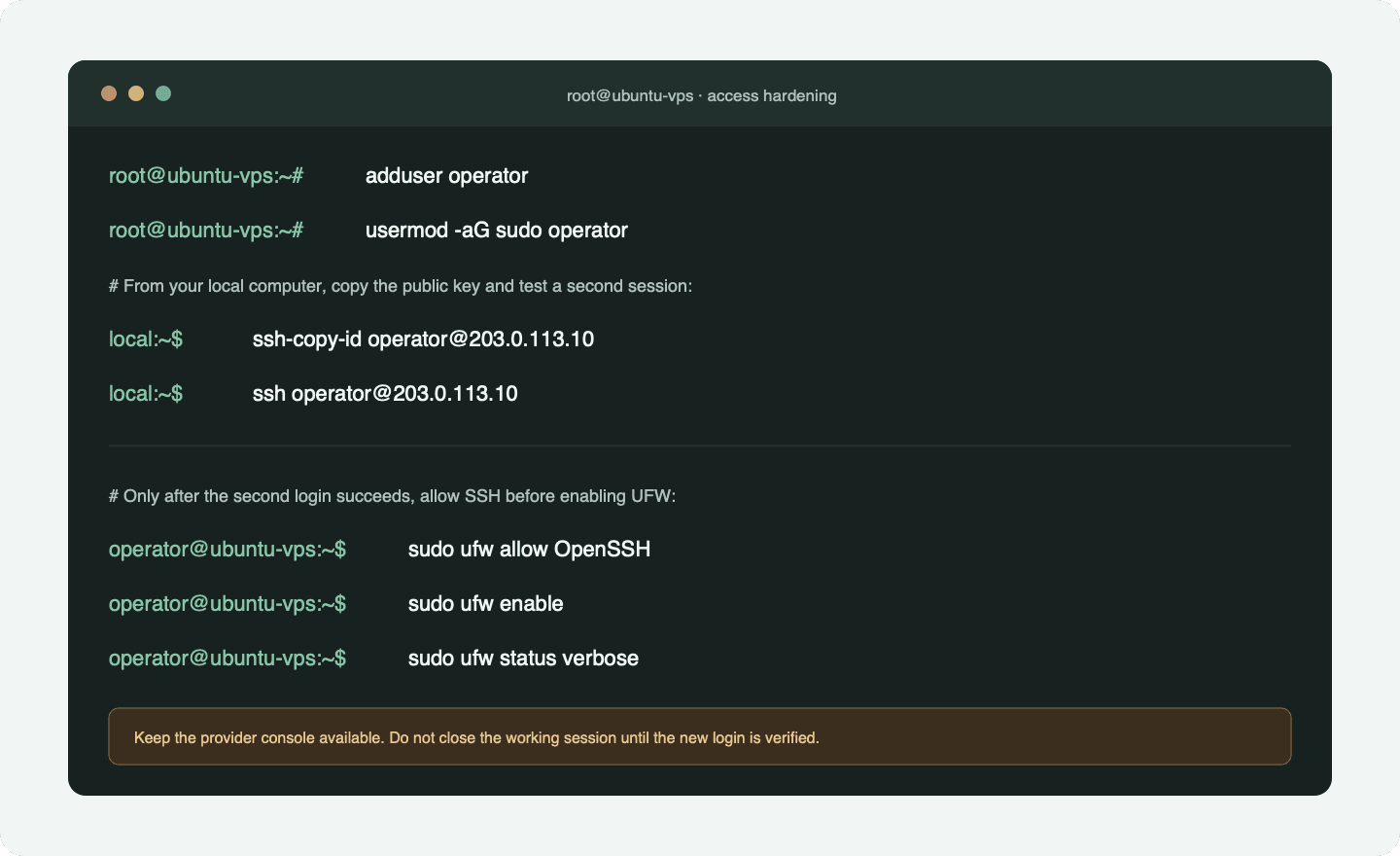
Create a provider snapshot or confirm the provider’s rescue console first. Keep the initial administrator session open until a second session using the new operator and its SSH key works. Never combine user creation, SSH lockdown, firewall activation, and deletion of the original access path into one unreviewed script.
Update the base system
Run on: VPS, as the initial sudo-capable account.
Purpose: refresh package indexes and install security updates.
Checkpoint: the commands complete without a package-manager error; review whether a reboot is required.
Recovery: use the provider console if the machine does not return after a reboot.
Source: Ubuntu package-management conventions.
sudo apt update
sudo apt upgrade
sudo apt install -y git tmux curl ca-certificates ufw
The non--y upgrade is intentional: read the proposed changes. If the image reports that a new kernel or core library requires a reboot, schedule it before starting important work.
Create a non-root operator
Run on: VPS, from the initial administrator session.
Purpose: separate routine repository work from the root account.
Checkpoint: id operator shows the new account and its sudo group.
Recovery: the original administrator session remains open.
Source: standard Ubuntu account-management commands.
sudo adduser operator
sudo usermod -aG sudo operator
id operator
Replace operator consistently if you prefer another non-sensitive username. Do not name accounts after a customer or expose a personal email in examples.
Copy the SSH key and verify a second login
Run on: your local computer.
Purpose: authorize an existing public key for the operator.
Checkpoint: a second terminal can log in as the operator and run sudo -v.
Recovery: return to the still-open administrator session or provider console.
Source: standard OpenSSH client and authorized-key workflow.
ssh-copy-id operator@203.0.113.10
ssh operator@203.0.113.10
sudo -v
203.0.113.10 is a documentation-only IP address. Replace it with your VPS address. On a client without ssh-copy-id, copy only the contents of your .pub public key into the operator’s ~/.ssh/authorized_keys; never upload the private key.
Enable UFW without locking out SSH
Warning: Complete the second-login check first. Keep the current session and provider console available. If your provider uses a non-standard SSH port, allow that exact port instead of the
OpenSSHprofile.
Run on: VPS, as the verified operator.
Purpose: set a default inbound boundary while retaining SSH.
Checkpoint: OpenSSH is allowed and the firewall reports active.
Recovery: run sudo ufw disable from the surviving session or provider console.
Source: official Ubuntu UFW documentation.
sudo ufw allow OpenSSH
sudo ufw enable
sudo ufw status verbose
Ubuntu documents UFW as its default firewall tool and shows the rule-before-enable sequence in its firewall guidance. Remote Control makes outbound HTTPS connections and does not require you to open a special inbound port for Claude Code.
Optional private-network access
Tailscale can reduce public exposure by placing the VPS and your devices in a private tailnet. Its official Linux installation guide offers a convenience script and distribution-specific package instructions. Prefer the signed repository instructions when your operating policy does not permit curl | sh.
Run on: VPS, after reviewing the installer and your tailnet policy.
Purpose: install the Tailscale client and enroll the server in a private network.
Checkpoint: tailscale status lists the intended node and account.
Recovery: remove or expire the node in the Tailscale admin console, then uninstall the package using the distribution instructions.
Source: official Tailscale Linux installation documentation.
curl -fsSL https://tailscale.com/install.sh | sh
sudo tailscale up
tailscale status
Do not close public SSH until you have tested private access, reviewed tailnet ACLs, and kept a provider-console recovery route. Tailscale SSH is an additional choice, not a prerequisite for Claude Code.
Optional automatic updates and login throttling
Ubuntu 24.04 Server normally includes unattended-upgrades for daily security updates, but provider images and organisation policy can differ. Review the active policy, maintenance window, reboot behaviour, logs, and third-party repository coverage against Canonical’s security-update guidance before relying on it.
If public SSH remains reachable, Fail2Ban can temporarily block addresses that repeatedly fail authentication. Treat it as an optional second layer, not a substitute for SSH keys, restricted network access, or recovery access. The jail must match the host’s SSH service and journal backend, and administrative addresses must not be locked out accidentally; start from the distribution package and the project’s upstream documentation rather than an opaque hardening script.
Install Claude Code on the VPS
Anthropic currently recommends the native installer on Linux. Review the URL and the official installation page before piping a remote script to a shell. Organisations that require signed package repositories can use Anthropic’s documented apt repository instead.
Run on: VPS, as the non-root operator. Do not use sudo.
Purpose: install Claude Code for the operator account.
Checkpoint: the version and doctor commands run from a fresh login shell.
Recovery: follow the current uninstall instructions for the installation method; do not delete the whole home directory.
Source: official Claude Code setup documentation.
curl -fsSL https://claude.ai/install.sh | bash
exec "$SHELL" -l
claude --version
claude doctor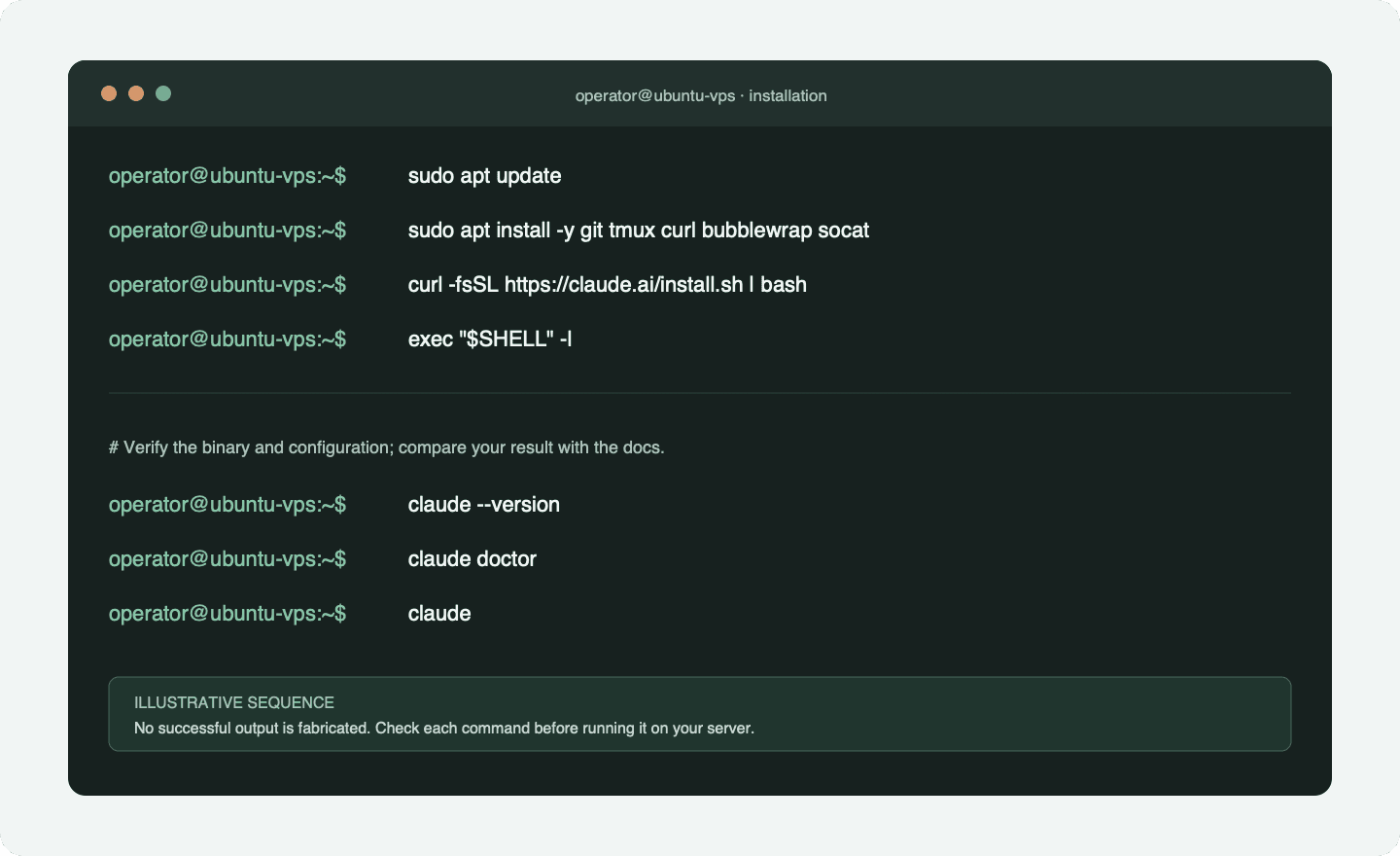
The native installation updates in the background by default. claude update applies an available update immediately. If claude is not found, start a new login shell, inspect the installer message for the binary directory, and compare echo "$PATH" with that location. Do not “fix” the problem by installing as root.
The npm path is a compatibility option, not the primary recommendation. At this review date it requires Node.js 18 or later, installs the same native binary through a platform package, and must not be run with sudo.
Run on: VPS shell as the non-root operator, only when npm is an explicit environment requirement.
Purpose: install the current Claude Code package through npm.
Checkpoint: claude --version resolves for the operator after a new login shell.
Recovery: use npm to uninstall the global package, then remove only configuration you have reviewed separately.
Source: official Claude Code advanced setup documentation.
node --version
npm install -g @anthropic-ai/claude-code
claude --version
Authenticate correctly on a headless server
For an interactive VPS session, run claude. If a browser cannot open on the server, Claude Code presents a URL or code that you can complete in a browser on another device. This is common over SSH.
Run on: VPS, as the non-root operator.
Purpose: start interactive authentication and the first Claude Code session.
Checkpoint: /status inside Claude Code reports the intended account and authentication method.
Recovery: use /logout, revoke the credential from its provider, or exit without granting repository tools.
Source: official Claude Code authentication documentation.
claudeAnthropic’s authentication documentation currently distinguishes these paths:
Swipe or scroll to compare the columns.
| Method | Use it for | Key boundary |
|---|---|---|
Subscription OAuth through /login | Interactive use and Remote Control | Remote Control requires eligible subscription authentication; API keys are not supported |
ANTHROPIC_API_KEY | API-billed CLI or non-interactive work | Takes precedence over subscription OAuth when present and approved |
apiKeyHelper | Short-lived keys retrieved from a vault | Helper output and refresh behaviour must be operated securely |
CLAUDE_CODE_OAUTH_TOKEN from claude setup-token | CI/scripts without browser login | Long-lived token; inference-only and cannot establish Remote Control |
| Bedrock, Vertex, or Foundry credentials | Organisation-selected cloud provider | Remote Control availability differs and must be checked |
Never paste a secret into a screenshot, CLAUDE.md, a committed .env, or a systemd unit. Environment variables can leak through shell history, process inspection, logs, backups, and diagnostics. For organisational use, prefer a credential helper or secret manager with a short lifetime and revocation procedure.
Check which account path is active inside Claude Code:
Run on: Claude Code session.
Purpose: inspect the active account, model, and authentication route.
Checkpoint: the displayed method matches the subscription or provider you intended.
Recovery: log out and correct the environment or provider configuration before continuing.
Source: official Claude Code authentication documentation.
/statusIf you intended to use a subscription but an old API key is taking precedence, leave Claude Code, remove the variable from the current shell, and authenticate again:
Run on: VPS shell, after exiting Claude Code.
Purpose: remove an API key from the current shell so subscription OAuth can be selected.
Checkpoint: a new session no longer reports API-key authentication.
Recovery: restore an approved key from the secret manager only if API billing was intentional.
Source: official Claude Code credential-precedence documentation.
unset ANTHROPIC_API_KEY
claude
Do not run unset blindly in a production service. First identify where its environment is defined and how the service is expected to authenticate.
Connect a repository with least privilege
Create a dedicated workspace owned by the operator. Start with a test repository or a disposable branch. A successful first session should prove navigation, reading, a small change, review, and recovery—not deployment authority.
Run on: VPS as the operator.
Purpose: clone one approved repository into a predictable directory.
Checkpoint: git remote -v names only the intended remote and git status is clean.
Recovery: revoke the Git credential before deleting the working copy if access is no longer required.
Source: standard Git clone and inspection commands.
mkdir -p ~/work
cd ~/work
git clone https://github.com/your-organisation/your-repository.git
cd your-repository
git remote -v
git status
claude
Use a GitHub App, fine-grained token, deploy key, or SSH key whose repository and write scope match the task. Avoid copying your laptop’s entire ~/.ssh directory. Keep production .env files, database credentials, signing keys, and customer exports outside the initial workspace.
Review repository-owned instructions before accepting tool use. CLAUDE.md, hooks, MCP configurations, package scripts, and files fetched from external sources can influence behaviour. Treat content in issues, logs, websites, emails, and chat messages as untrusted data, not authorization.
Keep a session available with tmux
tmux keeps a terminal process alive when your SSH client disconnects. It is a recovery-friendly baseline because you can reattach without opening an additional application port.
Run on: VPS in the repository.
Purpose: start Claude Code inside a named terminal session.
Checkpoint: detach, reconnect through SSH, and reattach to the same conversation.
Recovery: list sessions before killing anything; a dead process cannot be recovered by tmux.
Source: standard tmux session-management commands.
tmux new -s claude-vps
cd ~/work/your-repository
claude
Detach with Ctrl-b, then d. Later:
Run on: VPS shell after reconnecting through SSH.
Purpose: list and reattach to the named persistent terminal session.
Checkpoint: the expected Claude Code process and repository state are visible.
Recovery: if no session exists, inspect the host and repository state before starting a replacement.
Source: standard tmux session-management commands.
tmux ls
tmux attach -t claude-vps
If tmux ls reports no server, the tmux server or VPS restarted, or the session ended. Inspect shell history and logs, then create a new session. Do not assume an interrupted command completed. Verify Git state, generated files, external writes, and any deployment status before resuming.
Use Claude Code from a phone or browser
Official Remote Control is the recommended path for continuing a VPS session through Claude.ai or the Claude mobile app. Execution, MCP servers, tools, and filesystem access stay on the VPS. Session traffic and transcripts follow Anthropic’s documented data flow and retention policy.
Requirements at the review date include an eligible Pro, Max, Team, or Enterprise subscription login. API keys are not supported for Remote Control. Team and Enterprise administrators may need to enable the feature. Custom API endpoints, some cloud-provider configurations, and non-essential-traffic flags can also make the feature unavailable. The npm registry reported Claude Code 2.1.270 during this review; treat that as a dated reference, run claude update, and check the current Remote Control page because individual flags have their own version boundaries.
Start a remotely available interactive session:
Run on: VPS shell, in the approved repository.
Purpose: start Claude Code and publish a Remote Control session to your authenticated devices.
Checkpoint: Claude Code displays a remote-session URL or QR code and the session appears in the intended account.
Recovery: exit the session or disable Remote Control from the active Claude Code conversation.
Source: official Claude Code Remote Control documentation.
cd ~/work/your-repository
claude --remote-control "VPS workspace"
Or enable it inside an existing Claude Code conversation:
Run on: Claude Code session.
Purpose: add Remote Control to the conversation already running on the VPS.
Checkpoint: the named session becomes available on Claude.ai or the Claude app.
Recovery: disable Remote Control or end the local session; no inbound firewall rule needs removal.
Source: official Claude Code Remote Control documentation.
/remote-control VPS workspaceOpen the displayed URL or scan the QR code from your authenticated device. Remote Control uses outbound HTTPS and opens no inbound port on the VPS. That network property does not remove the need for repository permissions and human approval: the phone interface can still ask the VPS process to use whatever authority the operator account has.
Transcripts are synchronized through Anthropic while Remote Control is connected. Review Anthropic’s data-usage documentation, your account type, retention settings, and organisational requirements before exposing confidential repositories.
The Claude Desktop SSH environment is another official interface for a remote machine you manage. It is useful when you want the Desktop file, terminal, and diff experience, but it still depends on SSH access and is an alternative interface—not the default phone path in this guide.
Add the official Telegram Channel only when messaging is necessary
Channels let approved external events enter an active Claude Code session. At the review date, Channels are a research preview and the official Telegram plugin requires Bun. The plugin polls Telegram, so it does not require you to expose a web server, but the bot token and sender allowlist become additional security assets.
First install Bun using its current official installation instructions, then verify it:
Run on: VPS shell as the operator.
Purpose: confirm the Bun runtime required by the official Telegram Channel is available.
Checkpoint: Bun prints an installed version without a command-not-found error.
Recovery: remove the Bun installation using its official method if the Channel is abandoned.
Source: official Claude Code Channels and Bun installation documentation.
bun --versionInside Claude Code, install and configure the official plugin:
Run on: Claude Code session.
Purpose: install the official Telegram plugin, reload plugins, and store the bot token through its configuration flow.
Checkpoint: the plugin is listed and configuration completes without exposing the token in the repository.
Recovery: uninstall or disable the plugin and revoke the token through BotFather.
Source: official Claude Code Channels documentation.
/plugin install telegram@claude-plugins-official
/reload-plugins
/telegram:configure <token-from-BotFather>
Restart Claude Code with that Channel explicitly enabled:
Run on: VPS shell in the approved repository.
Purpose: launch a session that accepts events from the configured Telegram Channel.
Checkpoint: Claude Code reports the Channel as active without printing the bot token.
Recovery: exit the session; the Channel stops with it.
Source: official Claude Code Channels documentation.
claude --channels plugin:telegram@claude-plugins-officialSend a message to the bot, then approve the pairing code and enforce the allowlist inside Claude Code:
Run on: Claude Code session, after sending a test message from the intended Telegram account.
Purpose: pair one sender and restrict future messages to explicitly allowed identities.
Checkpoint: the test sender is paired and the policy reports allowlist.
Recovery: remove the sender, revoke the bot token, or stop the channel-enabled session.
Source: official Claude Code Telegram Channel access documentation.
/telegram:access pair <pairing-code>
/telegram:access policy allowlist
The bot can respond only while the Channel is active. Follow the current official Channels guide, because the flag and protocol may change during preview.
Warning: A paired sender is allowed to provide input; that identity does not make every requested action safe. Keep deployment, money movement, customer communication, database writes, credential changes, and destructive Git operations behind explicit human review.
A custom Node.js Telegram bot, SQLite conversation store, approval UI, and service manager can be justified when you need a tailored multi-repository router or organisation-specific controls. It is a separate software system, not a small configuration tweak. It needs authenticated sender mapping, token rotation, replay protection, prompt-injection handling, per-repository permissions, concurrency control, rate limits, logs, stop controls, and incident recovery.
Decide what “Claude Code 24/7” should mean
Do not choose a scheduler until you define the trigger, allowed action, success condition, timeout, retry policy, notification, owner, and recovery step.
For short-lived polling inside the current conversation, use a session task or /loop. Anthropic’s scheduled-task documentation says tasks fire only while Claude Code is running and idle, missed executions do not catch up, and recurring tasks expire after seven days. That is useful for “check the test run every ten minutes this afternoon,” not a permanent nightly operation.
For durable cloud work, Routines can start on a schedule, API call, or GitHub event. Each run is an autonomous cloud session. There is no interactive permission prompt during the run, and included connectors can perform writes. Remove unused repositories and connectors, restrict network access and environment variables, retain the default claude/ branch restriction where possible, and write a self-contained prompt with a verifiable output.
For a VPS-owned timer, use systemd or CI only after testing the exact non-interactive command manually. Current programmatic use relies on claude -p; --bare skips ambient hooks, skills, plugins, MCP servers, automatic memory, and CLAUDE.md, which improves reproducibility but requires explicit settings and API/helper authentication. Review headless mode and current billing before enabling it.
A self-managed schedule also needs:
- A dedicated Unix user and working directory.
- An explicit settings file and narrow allowed tools.
- A timeout and a lock preventing overlapping runs.
- Logs with retention and secret redaction.
- A non-zero exit path that alerts an owner.
- Idempotency or reconciliation for external writes.
- A kill switch and documented credential revocation.
- A manual review step before merging, deploying, messaging, or changing production data.
The downloadable pack includes commented systemd examples. They are templates for review, not a one-command deployment.
Configure permissions, sandboxing, and human approval

Claude Code permissions and the operating-system sandbox solve different parts of the problem. Permissions decide which tools and patterns Claude may attempt. The sandbox enforces filesystem and network constraints on Bash and its child processes. Anthropic recommends using both as defense in depth in its permissions and sandboxing documentation.
On Ubuntu/Debian, install the documented Linux sandbox dependencies:
Run on: VPS shell as the verified sudo-capable operator.
Purpose: install the operating-system packages used by Claude Code sandboxing on Linux.
Checkpoint: both packages are installed and /sandbox can inspect the environment.
Recovery: remove the packages only after confirming no other workload depends on them.
Source: official Claude Code sandboxing documentation.
sudo apt-get install bubblewrap socatThen use /sandbox inside Claude Code to inspect and enable the appropriate mode. In a managed environment where sandboxing is a required security gate, configure it to fail closed rather than silently falling back:
Run on: a reviewed Claude Code settings scope, starting with the project or test user rather than a shared production account.
Purpose: require sandbox availability and prohibit unsandboxed command fallback.
Checkpoint: /sandbox reports an active sandbox and a deliberate failure occurs if the dependency is unavailable.
Recovery: revert the settings file from version control or a backup; do not weaken the gate merely to hide an unexplained failure.
Source: official Claude Code sandbox settings documentation.
{
  "sandbox": {
    "enabled": true,
    "failIfUnavailable": true,
    "allowUnsandboxedCommands": false
  }
}
Add explicit content-scoped ask rules for consequential commands and deny rules for sensitive paths. Deny rules take precedence over allow rules. Do not rely on one Bash(rm -rf *) pattern as a complete deletion control: shells have many equivalent forms, scripts can wrap commands, and tools outside Bash have separate boundaries.
A practical approval ladder is:
- Read and explain: repository files and documented public sources inside the approved workspace.
- Edit locally: changes on a disposable branch, with a diff for review.
- Run bounded checks: commands whose side effects and resource use are understood.
- Prepare an external action: draft a message, migration, deployment, payment, or data update without executing it.
- Human approval: the responsible person reviews the exact target and change.
- Execute and reconcile: perform the action, record the result, and verify the destination state.
Never use bypass-permissions mode as a convenience on a general-purpose VPS. Anthropic limits that mode to isolated environments; an ordinary server account containing repositories and credentials is not automatically isolated.
Operations, updates, backup, and revocation
A useful VPS guide must include the boring recovery work. Assign an owner and calendar reminder for these checks:
Run on: VPS shell during a planned maintenance window.
Purpose: inspect Claude Code health, available updates, host capacity, tmux sessions, and firewall state.
Checkpoint: review each result and record any update, capacity, or access action needed.
Recovery: claude update is the only mutating command in this group; follow the current installation method’s rollback or reinstall guidance if an update fails.
Source: official Claude Code setup documentation plus standard Linux health commands.
claude --version
claude doctor
claude update
df -h
free -h
tmux ls
sudo ufw status verbose
For package and service problems, review the relevant journal rather than publishing it indiscriminately:
Run on: VPS shell as the service owner.
Purpose: inspect one named user service and its recent journal entries.
Checkpoint: identify a specific exit status, path, permission, or environment error without copying secrets elsewhere.
Recovery: stop the service before changing its unit or environment, then restore the last reviewed configuration if needed.
Source: standard systemd user-service diagnostics.
systemctl --user status your-service-name
journalctl --user -u your-service-name --since today
Logs can contain repository paths, prompts, tool arguments, and errors with sensitive context. Limit access and retention. Anthropic also stores local session transcripts under the operator’s Claude configuration directory according to its documented policy; do not treat a VPS disk as automatically encrypted or private because SSH is enabled.
Server verification checklist
- Provider-console or rescue access is documented and usable by an accountable owner.
- The non-root operator can authenticate with a key in a second session before any SSH restriction changes.
- The real SSH port is allowed, unnecessary inbound ports are closed, and private-network ACLs are reviewed.
/status, repository remotes, Unix ownership, and Git credential scope match the intended account and project.- Permission rules, sandbox availability, and human-approval actions have been tested in a disposable branch.
- Remote Control appears only in the intended account; Channel pairing and allowlists contain only intended senders.
- Every timer, service, CI job, or Routine has an owner, timeout, lock, failure alert, and stop procedure.
- Secret-like values are absent from the repository, screenshots, unit files, shell examples, and downloadable artifacts.
- Logs, disk usage, snapshots, updates, credential rotation, and decommissioning each have a review date.
Back up source through the canonical Git remote. Back up only the minimum additional configuration needed to rebuild the host, encrypt it, and test restoration. Avoid copying credential files into a general snapshot without understanding the provider’s encryption and account access.
When access is no longer required:
- Stop and disable Channel, Remote Control, or systemd processes.
- Revoke Telegram bot tokens, Git credentials, Claude/API credentials, Tailscale nodes, and provider API keys as applicable.
- Review remote branches, pull requests, messages, and external writes created under that identity.
- Remove the VPS from private networks and DNS.
- Export only approved logs, then delete the server through the provider account.
- Confirm billing, snapshots, volumes, and backups are also removed or retained deliberately.
Troubleshooting the common failure modes
claude: command not found
Start a new login shell with exec "$SHELL" -l, inspect the installer’s selected binary directory, and compare it with echo "$PATH". Run claude doctor once the executable resolves. Do not reinstall as root to mask a per-user PATH issue.
Authentication cannot complete over SSH
Copy the displayed login URL or code into a browser on your own device. Confirm the account includes Claude Code access. Use /status to see the active method, and check whether ANTHROPIC_API_KEY, a provider flag, proxy endpoint, or older credential is taking precedence.
Remote Control will not connect
Verify subscription OAuth, organisation enablement, current Claude Code version, and direct access to the Anthropic API. API keys, custom base URLs, certain cloud-provider modes, Zero Data Retention, and non-essential-traffic flags can make Remote Control unavailable. Read the error before restarting; reconnecting can take over a session active on another device.
The tmux session disappeared
tmux ls distinguishes an available detached session from no tmux server. Check uptime and reboot history. Inspect repository status and external systems before re-running a command that may have partially completed.
The Telegram bot does not reply
Confirm Bun, plugin installation, /reload-plugins, the token, the --channels launch flag, pairing, and allowlist. The official bot only replies while the channel-enabled Claude Code session is active. Never print the bot token into a support ticket.
UFW blocked SSH
Use the still-open session or provider console to inspect sudo ufw status numbered. Disable UFW temporarily only through a trusted recovery channel, then add the correct SSH port rule and re-enable it. Do not repeatedly reboot hoping the rule changes.
A systemd service works manually but fails as a service
User services have a different environment and PATH from an interactive shell. Use an absolute executable path, an explicit working directory, and an environment file with restrictive permissions when necessary. Review systemctl --user status and journalctl --user; never solve it by moving credentials into a world-readable file.
Usage or costs are unexpected
Subscription usage and API billing are different. /usage shows relevant session information, while Anthropic’s Console is authoritative for API billing. Repository size, model, context, parallel sessions, automation frequency, and retries all change usage. Start with one bounded task and a budget alert; see Anthropic’s cost guidance.
Frequently asked questions
Is a 4 GB VPS enough for Claude Code?
Four gigabytes is Anthropic’s documented minimum. It may be enough for the client and a small repository, but builds, language servers, containers, browsers, databases, and concurrent sessions often justify 8 GB or more. Measure the actual project rather than buying from a generic “best VPS” list.
Can I use Claude Code from my phone without opening a port?
Yes, when your account and configuration support Remote Control. The VPS session makes outbound HTTPS connections; the feature does not open a new inbound port. SSH still needs its own reachable path unless you rely exclusively on a private network and provider console.
Does tmux make Claude Code run forever?
No. tmux keeps the terminal session alive after the SSH client disconnects. A terminated process, reboot, out-of-memory kill, expired credential, or network failure can still stop the work.
Is the official Telegram Channel a 24/7 bot?
Not by itself. It delivers messages to a Claude Code session launched with the Channel enabled, and it can only respond while that channel is active. It is also a research preview at the review date.
Should I use Remote Control, Telegram, or a custom bot?
Use Remote Control when one authenticated operator wants the full Claude interface from another device. Use an official Channel when a supported messaging surface is genuinely useful. Build a custom bot only when you need product-specific routing, permissions, memory, or approval UX and are prepared to maintain a separate service.
Can I run Claude Code unattended with cron or systemd?
Technically yes, through supported non-interactive invocation, but it is an automation system rather than an interactive tutorial step. Use an explicit auth method, settings file, allowed tools, lock, timeout, logs, alerts, idempotency, and human review for consequential outputs. Routines or CI may be a better fit.
Is code private because execution stays on my VPS?
No. Filesystem access and tools execute on the VPS, but model requests require network data transfer and Remote Control synchronizes transcripts. Account type, provider, retention, telemetry, feedback settings, repository contents, and local disk protection all matter. Review the current data-usage policy for your organisation.
How should I estimate cost?
Separate the VPS bill from Claude subscription or API usage and from operational maintenance. API cost varies with model, context, repository size, parallel sessions, and automation frequency. Use a small pilot, /usage, provider billing, and explicit limits rather than a universal monthly estimate.
When is a VPS better than a laptop, Mac mini, or cloud Routine?
Choose a VPS when you need a replaceable Linux environment, provider-console recovery, predictable network identity, and access from several devices without leaving a personal machine exposed. A laptop is simpler for local work; a Mac mini suits workloads tied to macOS or owned hardware; a cloud Routine suits durable, narrowly scoped scheduled work that does not need the VPS environment. Prefer the smallest operating model that meets the requirement.
Download the pack and choose the next step
The configuration pack below includes a bilingual README, a restrictive settings example, tmux configuration, commented systemd templates, verification and recovery checklists, and the official source list. It contains no secrets and does not automatically change a server.
Read the files before copying them. Replace paths deliberately, check the installed Claude binary with command -v claude, and test in a disposable repository. The pack is an implementation aid, not evidence that your VPS, authentication, network, or production workflow has been verified.
For the broader decision about where AI belongs in a business process, read AI integration for controlled business processes and the AutomateFlow delivery methodology. If the agent needs access to internal systems, deployments, customer communication, or operational data, the next useful step is an architecture and authority review—not a wider permission rule.
Practical pack, no form required
Bilingual README, restrictive settings, tmux and systemd examples, verification, and recovery steps. No secrets or automatic configuration.
ZIP · 7.6 KB
SHA-256: 6f201907d6994bb5f9d3295f861f4a6ee7da5b1b67e09fd33388188df32982b0
Material history
Initial public version or material revision.
Suggest a correction
Include the page and the source supporting the proposed change.